Showing posts with label NETWORK. Show all posts

Friday, 2 January 2009

F5D8010 Wireless


Free your life of wires and connect your laptop to the world with the Belkin® F5D8010 Wireless PRE-N Notebook Adapter, which delivers 800% greater reception than a standard 802.11g adapter. Anytime the adapter senses potential interference, it automatically shifts to the best available wireless signal.


Model Number: BKNF5D8010
800% greater coverage than standard 802.11g & 600% greater speeds than standard 802.11g
Increases wireless coverage up to 20% when using adapter with older 802.11g or 802.11b networking products
Senses potential interference & dynamically shifts to the clearest wireless channel available
Continues to transmit at a link rate of 108 Mbps
Wi-Fi protected access support provides enhanced encryption protecting wireless networks
6 months of free pop-up, adware & spyware stopper

Thursday, 16 October 2008

What is GPRS

General Packet Radio Service (GPRS) is a packet oriented Mobile Data Service available to users of Global System for Mobile Communications (GSM) and IS-136 mobile phones. It provides data rates from 56 up to 114 kbit/s. GPRS is a technology which is changing the present shape of mobile communication.
GPRS can be used for services such as Wireless Application Protocol (WAP) access, Short Message Service (SMS), Multimedia Messaging Service (MMS), and for Internet communication services such as email and World Wide Web access. GPRS data transfer is typically charged per megabyte of traffic transferred, while data communication via traditional circuit switching is billed per minute of connection time, independent of whether the user actually is using the capacity or is in an idle state. GPRS is a best-effort packet switched service, as opposed to circuit switching, where a certain Quality of Service (QoS) is guaranteed during the connection for non-mobile users.
2G cellular systems combined with GPRS are often described as "2.5G", that is, a technology between the second (2G) and third (3G) generations of mobile telephony. It provides moderate speed data transfer, by using unused Time division multiple access (TDMA) channels in, for example, the GSM system. Originally there was some thought to extend GPRS to cover other standards, but instead those networks are being converted to use the GSM standard, so that GSM is the only kind of network where GPRS is in use. GPRS is integrated into GSM Release 97 and newer releases. It was originally standardized by European Telecommunications Standards Institute (ETSI), but now by the 3rd Generation Partnership Project (3GPP).

Network deployment WiBro

Network deployment
SK Telecom and Hanaro Telecom have announced a partnership to roll out WiBro nationwide in Korea, excluding Seoul and six provincial cities, where independent networks will be rolled out.
In November 2004, Intel and LG Electronics executives agreed to ensure compatibility between WiBro and WiMAX technology
In September 2005, Samsung Electronics signed a deal with Sprint Nextel Corporation to provide equipment for a WiBro trial .
In November 2005, KT Corporation(aka Korea Telecom) showed off WiBro trial services during the Asia-Pacific Economic Cooperation (APEC) summit in Busan.
February 10th 2006: Telecom Italia, the dominant telephony and internet service provider in Italy, together with Korean Samsung Electronics, has demonstrated to the public a WiBro network service on the occasion of the 2006 Winter Olympics, held in Turin, with downspeed of 10 Mbit/s and upspeed of some hundreds of kbit/s even in movement up to 120 km/h.
In the same event Samsung tlc div. president Kitae Lee assured a future of 20-30 Mbit/s by the end of this year (2006) and 100+ Mbit/s down / 1+ Mbit/s up in 2008 .
KT Corporation launched commercial WiBro service in mid-2006 as reported. Sprint (US), BT (UK), KDDI (JP), and TVA (BR) have or are trialing WiBro.
KT Corporation and SK Telecom launched WiBro around Seoul on June 30, 2006. More about the KT launch .
On April 3, 2007, KT launched WiBro coverage for all areas of Seoul including all subway lines.

What is WiBro

WiBro (Wireless Broadband) is a wireless broadband Internet technology being developed by the South Korean telecoms industry. WiBro is the South Korean service name for IEEE 802.16e (mobile iMaxernational standard.
WiBro adopts TDD for duplexing, OFDMA for multiple access and 8.75 MHz as a channel bandwidth. WiBro was devised to overcome the data rate limitation of mobile phones (for example CDMA 1x) and to add mobility to broadband Internet access (for example ADSL or Wireless LAN). In February 2002, the Korean government allocated 100 MHz of electromagnetic spectrum in the 2.3 - 2.4 GHz band, and in late 2004 WiBro Phase 1 was standardized by the TTA of Korea and in late 2005 ITU reflected WiBro as IEEE 802.16e (mobile WiMax South Korean Telco (KT,SKT) launched commercial service in June 2006, and the tariff is around US$30.
WiBro base stations will offer an aggregate data throughput of 30 to 50 Mbit/s and cover a radius of 1-5 km allowing for the use of portable internet usage. In detail, it will provide mobility for moving devices up to 120 km/h (74.5 miles/h) compared to Wireless LAN having mobility up to walking speed and Mobile Phone having mobility up to 250 km/h. From testing during the APEC Summit in Busan in late 2005, the actual range and bandwidth were quite a bit lower than these numbers. The technology will also offer Quality of Service. The inclusion of QoS allows for WiBro to stream video content and other loss-sensitive data in a reliable manner. These all appear to be (and may be) the stronger advantages over the fixed WiMax standard (802.16a). Some Telcos in many countries are trying to commercialize this Mobile WiMAX (or WiBro). For example, TI (Italia), (Brazil), Omnivision (Venezuela), PORTUS (Croatia), and Arialink (Michigan) will provide commercial service after test service around 2006-2007. While WiBro is quite exacting in its requirements from spectrum use to equipment design, WiMAX leaves much of this up to the equipment provider while providing enough detail to ensure interoperability between designs.

Evolution 2G to 3G

Evolution from 2G to 3G
2G networks were built mainly for voice data and slow transmission. Due to rapid changes in user expectation, they do not meet today's wireless needs.Cellular mobile telecommunications networks are being upgraded to use 3G technologies from 1999 to 2010. Japan was the first country to introduce 3G nationally, and in Japan the transition to 3G was largely completed in 2006. Korea then adopted 3G Networks soon after and the transition was made as early as 2004
From 2G to 2.5G (GPRS)
"2.5G" (and even 2.75G) are technologies such as i-mode data services, camera phones, high-speed circuit-switched data (HSCSD) and General packet radio service (GPRS) that provide some functionality domains like 3G networks, but without the full transition to 3G network. They were built to introduce the possibilities of wireless application technology to the end consumers, and so increase demand for 3G services.
When converting a GSM network to a UMTS network, the first new technology is General Packet Radio Service (GPRS). It is the trigger to 3G services. The network connection is always on, so the subscriber is online all the time. From the operator's point of view, it is important that GPRS investments are re-used when going to UMTS. Also capitalizing on GPRS business experience is very important.
From GPRS, operators could change the network directly to UMTS, or invest in an EDGE system. One advantage of EDGE over UMTS is that it requires no new licenses. The frequencies are also re-used and no new antennas are needed.
Migrating from GPRS to UMTS
From GPRS network, the following network elements can be reused:
Home location register (HLR)
Visitor location register (VLR)
Equipment identity register (EIR)
Mobile switching centre (MSC) (vendor dependent)
Authentication centre (AUC)
Serving GPRS Support Node (SGSN) (vendor dependent)
Gateway GPRS Support Node (GGSN)
From Global Service for Mobile (GSM) communication radio network, the following elements cannot be reused
Base station controller (BSC)
Base transceiver station (BTS)
They can remain in the network and be used in dual network operation where 2G and 3G networks co-exist while network migration and new 3G terminals become available for use in the network.
The UMTS network introduces new network elements that function as specified by 3GPP:
Node B (base station)
Radio Network Controller (RNC)
Media Gateway (MGW)
The functionality of MSC and SGSN changes when going to UMTS. In a GSM system the MSC handles all the circuit switched operations like connecting A- and B-subscriber through the network. SGSN handles all the packet switched operations and transfers all the data in the network. In UMTS the Media gateway (MGW) take care of all data transfer in both circuit and packet switched networks. MSC and SGSN control MGW operations. The nodes are renamed to MSC-server and GSN-server.

Advantages 3G network

Advantages of a layered network architecture
Unlike GSM, UMTS is based on layered services. At the top is the services layer, which provides fast deployment of services and centralized location. In the middle is the control layer, which helps upgrading procedures and allows the capacity of the network to be dynamically allocated. At the bottom is the connectivity layer where any transmission technology can be used and the voice traffic will transfer over ATM/AAL2 or IP/RTP.
3G evolution (pre-4G)
See also section Pre-4G wireless standards of the 4G article.
The standardization of 3G evolution is working in both 3GPP and 3GPP2. The corresponding specifications of 3GPP and 3GPP2 evolutions are named as LTE and UMB, respectively. 3G evolution uses partly beyond 3G technologies to enhance the performance and to make a smooth migration path.
There are several different paths from 2G to 3G. In Europe the main path starts from GSM when GPRS is added to a system. From this point it is possible to go to the UMTS system. In North America the system evolution will start from Time division multiple access (TDMA), change to Enhanced Data Rates for GSM Evolution (EDGE) and then to UMTS.
In Japan, two 3G standards are used: W-CDMA used by NTT DoCoMo (FOMA, compatible with UMTS) and SoftBank Mobile (UMTS), and CDMA2000, used by KDDI. Transition for market purposes to 3G was completed in Japan in 2006.The first introduction of 3G technology in the Caribbean (2008) was done by American Movil(Claro)formerly MIPHONE in Jamaica. The Implementiotion phase of this network was carried out by Huawei in conjuction with other sub contractors like Trylon TSF out of Canada.

Phones and networks 3G

Phones and networks
3G technologies enable network operators to offer users a wider range of more advanced services while achieving greater network capacity through improved spectral efficiency.
UMTS terminals
The technical complexities of a 3G phone or handset depends on its need to roam onto legacy 2G networks. In the first countries, Japan and South Korea, there was no need to include roaming capabilities to older networks such as GSM, so 3G phones were small and lightweight. In Europe and America, the manufacturers and network operators wanted multi-mode 3G phones which would operate on 3G and 2G networks (e.g., W-CDMA and GSM), which added to the complexity, size, weight, and cost of the handset. As a result, early European W-CDMA phones were significantly larger and heavier than comparable Japanese W-CDMA phones.
Japan's Vodafone KK experienced a great deal of trouble with these differences when its UK-based parent, Vodafone, insisted the Japanese subsidiary use standard Vodafone handsets. Japanese customers who were accustomed to smaller handsets were suddenly required to switch to European handsets that were much bulkier and considered unfashionable by Japanese consumers. During this conversion, Vodafone KK lost 6 customers for every 4 that migrated to 3G. Soon thereafter, Vodafone sold the subsidiary (now known as SoftBank Mobile).
The general trend to smaller and smaller phones seems to have paused, perhaps even turned, with the capability of large-screen phones to provide more video, gaming and internet use on the 3G networks.
Speed
The ITU has not provided a clear definition of the speeds users can expect from 3G equipment or providers. Thus users sold 3G service may not be able to point to a standard and say that the speeds it specifies are not being met. While stating in commentary that "it is expected that IMT-2000 will provide higher transmission rates: a minimum speed of 2Mbit/s for stationary or walking users, and 348 [sic] kbit/s in a moving vehicle," the ITU does not actually clearly specify minimum or average speeds or what modes of the interfaces qualify as 3G, so various speeds are sold as 3G intended to meet customers expectations of broadband speed. It is often suggested by industry sources that 3G can be expected to provide 384 kbit/s at or below pedestrian speeds, but only 128 kbit/s in a moving car. While EDGE is part of the 3G standard, some phones report EDGE and 3G network availability as separate things, notably the iPhone.
Network standardization
The International Telecommunication Union (ITU) defined the demands for 3G mobile networks with the IMT-2000 standard. An organization called 3rd Generation Partnership Project (3GPP) has continued that work by defining a mobile system that fulfills the IMT-2000 standard. This system is called Universal Mobile Telecommunications System (UMTS).

Implementation 3G

Implementation and history
The first pre-commercial 3G network was launched by NTT DoCoMo in Germany branded FOMA, in May 2001 on a pre-release of W-CDMA-GA3Y technology. The first commercial launch of 3G was also by NTT DoCoMo in Japan on October 1, 2001. The second network to go commercially live was by SK Telecom in South Korea on the CDMA2000 1xEV-DO technology in January 2002. By May 2002 the second South Korean 3G network was launched by KTF on EV-DO and thus the Koreans were the first to see competition among 3G operators.
The first European pre-commercial network was at the Isle of Man by Manx Telecom, the operator owned by British Telecom, and the first commercial network in Europe was opened for business by Telenor in December 2001 with no commercial handsets and thus no paying customers. These were both on the W-CDMA technology.
The first commercial United States 3G network was by Monet Mobile Networks, on CDMA2000 1x EV-DO technology, but this network provider later shut down operations. The second 3G network operator in the USA was Verizon Wireless in October 2003 also on CDMA2000 1x EV-DO, and this network has grown strongly since then.
The first pre-commercial demonstration network in the southern hemisphere was built in Adelaide, South Australia by m.Net Corporation in February 2002 using UMTS on 2100 MHz. This was a demonstration network for the 2002 IT World Congress. The first commercial 3G network was launched by Hutchison Telecommunications branded as Three in April 2003.
In December 2007, 190 3G networks were operating in 40 countries and 154 HSDPA networks were operating in 71 countries, according to the GMSA. In Asia, Europe, Canada and the USA, telecommunication companies use W-CDMA technology with the support of around 100 terminal designs to operate 3G mobile networks.
In Europe, mass market commercial 3G services were introduced starting in March 2003 by 3 (Part of Hutchison Whampoa) in the UK and Italy. The European Union Council suggested that the 3G operators should cover 80% of the European national populations by the end of 2005.
Roll-out of 3G networks was delayed in some countries by the enormous costs of additional spectrum licensing fees. (See Telecoms crash.) In many countries, 3G networks do not use the same radio frequencies as 2G, so mobile operators must build entirely new networks and license entirely new frequencies; an exception is the United States where carriers operate 3G service in the same frequencies as other services. The license fees in some European countries were particularly high, bolstered by government auctions of a limited number of licenses and sealed bid auctions, and initial excitement over 3G's potential. Other delays were due to the expenses of upgrading equipment for the new systems.
By June 2007 the 200 millionth 3G subscriber had been connected. Out of 3 billion mobile phone subscriptions worldwide this is only 6.7%. In the countries where 3G was launched first - Japan and South Korea - over half of all subscribers use 3G. In Europe the leading country is Italy with a third of its subscribers migrated to 3G. Other leading countries by 3G migration include UK, Austria, Australia and Singapore at the 20% migration level. A confusing statistic is counting CDMA 2000 1x RTT customers as if they were 3G customers. If using this oft-disputed definition, then the total 3G subscriber base would be 475 million at June 2007 and 15.8% of all subscribers worldwide.
Still several major countries such as Turkey, China, Indonesia, etc have not awarded 3G licenses and customers await 3G services. China has been delaying its decisions on 3G for many years, partly hoping to have the Chinese 3G standard, TD-SCDMA, to mature for commercial production.
China announced in May 2008, that the telecoms sector was re-organized and three 3G networks would be allocated so that the largest mobile operator, China Mobile, would retain its GSM customer base and launch 3G onto the Chinese standard, TD-SCDMA. China Unicom would retain its GSM customer base but relinquish its CDMA2000 customer base, and launch 3G on the globally leading WCDMA (UMTS) standard. The CDMA2000 customers of China Unicom would go to China Telecom, which would then launch 3G on the CDMA 1x EV-DO standard. This means that China will have all three main cellular technology 3G standards in commercial use.
The first African use of 3G technology was a 3G videocall made in Johannesburg on the Vodacom network in November 2004. The first commercial launch of 3G in Africa was by EMTEL in Mauritius on the W-CDMA standard. In north African Morocco in late March 2006, a 3G service was provided by the new company Wana.
Rogers Wireless began implementing 3G HSDPA services in eastern Canada early 2007 in the form of Rogers Vision. Fido Solutions and Rogers Wireless now offer 3G service in most urban centres.

What is 3G

3G is the third generation of mobile phone standards and technology, superseding 2.5G. It is based on the International Telecommunication Union (ITU) family of standards under the IMT-2000.
3G networks enable network operators to offer users a wider range of more advanced services while achieving greater network capacity through improved spectral efficiency. Services include wide-area wireless voice telephony, video calls, and broadband wireless data, all in a mobile environment. Additional features also include HSPA data transmission capabilities able to deliver speeds up to 14.4Mbit/s on the downlink and 5.8Mbit/s on the uplink.
Unlike IEEE 802.11 (common names Wi-Fi or WLAN) networks, 3G networks are wide area cellular telephone networks which evolved to incorporate high-speed internet access and video telephony IEEE 802.11 networks are short range, high-bandwidth networks primarily developed for data.

Standard devices Wi-Fi

Standard devices


An embedded RouterBoard 112 with U.FL-RSMA pigtail and R52 mini PCI Wi-Fi card widely used by wireless Internet service providers (WISPs) in the Czech Republic.


OSBRiDGE 3GN – 802.11n Access Point and UMTS/GSM Gateway in one device.


USB wireless adaptor
A wireless access point connects a group of wireless devices to an adjacent wired LAN. An access point is similar to a network hub, relaying data between connected wireless devices in addition to a (usually) single connected wired device, most often an ethernet hub or switch, allowing wireless devices to communicate with other wired devices.
Wireless adapters allow devices to connect to a wireless network. These adapters connect to devices using various external or internal interconnects such as PCI, miniPCI, USB, ExpressCard, Cardbus and PC card. Most newer laptop computers are equipped with internal adapters. Internal cards are generally more difficult to install.
Wireless routers integrate a WAP, ethernet switch, and internal Router firmware application that provides IP Routing, NAT, and DNS forwarding through an integrated WAN interface. A wireless router allows wired and wireless ethernet LAN devices to connect to a (usually) single WAN device such as cable modem or DSL modem. A wireless router allows all three devices (mainly the access point and router) to be configured through one central utility. This utility is most usually an integrated web server which serves web pages to wired and wireless LAN clients and often optionally to WAN clients. This utility may also be an application that is run on a desktop computer such as Apple's AirPort.
Wireless network bridges connect a wired network to a wireless network. This is different from an access point in the sense that an access point connects wireless devices to a wired network at the data-link layer. Two wireless bridges may be used to connect two wired networks over a wireless link, useful in situations where a wired connection may be unavailable, such as between two separate homes.
Wireless range extenders or wireless repeaters can extend the range of an existing wireless network. Range extenders can be strategically placed to elongate a signal area or allow for the signal area to reach around barriers such as those created in L-shaped corridors. Wireless devices connected through repeaters will suffer from an increased latency for each hop. Additionally, a wireless device connected to any of the repeaters in the chain will have a throughput that is limited by the weakest link between the two nodes in the chain from which the connection originates to where the connection ends.

Reach Wi-Fi

Reach
Due to reach requirements for wireless LAN applications, power consumption is fairly high compared to some other low-bandwidth standards. Especially Zigbee and Bluetooth supporting wireless PAN applications refer to much lesser propagation range of
Mobility
Speed vs. Mobility of wireless systems: Wi-Fi, HSPA, UMTS,GSM
Because of the very limited practical range of Wi-Fi, mobile use is essentially confined to such applications as inventory taking machines in warehouses or retail spaces, barcode reading devices at check-out stands or receiving / shipping stations. Mobile use of Wi-Fi over wider ranges is limited to move, use, move, as for instance in an automobile moving from one hotspot to another. Other wireless technologies are more suitable as illustrated in the graphic.
Threats to security


The most common wireless encryption standard, Wired Equivalent Privacy or WEP, has been shown to be easily breakable even when correctly configured. Wi-Fi Protected Access (WPA and WPA2), which began shipping in 2003, aims to solve this problem and is now available on most products. Wi-Fi Access Points typically default to an "open" (encryption-free) mode. Novice users benefit from a zero-configuration device that works out of the box, but this default is without any wireless security enabled, providing open wireless access to their LAN. To turn security on requires the user to configure the device, usually via a software graphical user interface (GUI). Wi-Fi networks that are open (unencrypted) can be monitored and used to read and copy data (including personal information) transmitted over the network, unless another security method is used to secure the data, such as a VPN or a secure web page. (See HTTPS/Secure Socket Layer.)
Population
Many 2.4 GHz 802.11b and 802.11g Access points default to the same channel on initial startup, contributing to congestion on certain channels. To change the channel of operation for an access point requires the user to configure the device. Yet, this default use of channels 1, 6 and 11 gives better performance than "advanced" users choosing channels 2, 5, 7 and 9 as "unused, free".

Advantages Wi-Fi

Advantages and challenges
A keychain size Wi-Fi detector.
Operational advantages


Wi-Fi allows LANs (Local Area Networks) to be deployed without cabling for client devices, typically reducing the costs of network deployment and expansion. Spaces where cables cannot be run, such as outdoor areas and historical buildings, can host wireless LANs.
In 2008, wireless network adapters are built into most modern laptops. The price of chipsets for Wi-Fi continues to drop, making it an economical networking option included in even more devices. Wi-Fi has become widespread in corporate infrastructures.
Different competitive brands of access points and client network interfaces are inter-operable at a basic level of service. Products designated as "Wi-Fi Certified" by the Wi-Fi Alliance are backwards compatible. Wi-Fi is a global set of standards. Unlike mobile telephones, any standard Wi-Fi device will work anywhere in the world.
Wi-Fi is widely available in more than 220,000 public hotspots and tens of millions of homes and corporate and university campuses worldwide. WPA is not easily cracked if strong passwords are used and WPA2 encryption has no known weaknesses. New protocols for Quality of Service (WMM) make Wi-Fi more suitable for latency-sensitive applications (such as voice and video), and power saving mechanisms (WMM Power Save) improve battery operation.
Limitations
Spectrum assignments and operational limitations are not consistent worldwide. Most of Europe allows for an additional 2 channels beyond those permitted in the U.S. for the 2.4 GHz band. (1–13 vs. 1–11); Japan has one more on top of that (1–14). Europe, as of 2007, was essentially homogeneous in this respect. A very confusing aspect is the fact that a Wi-Fi signal actually occupies five channels in the 2.4 GHz band resulting in only three non-overlapped channels in the U.S.: 1, 6, 11, and three or four in Europe: 1, 5, 9, 13 can be used if all the equipment on a specific area can be guaranteed not to use 802.11b at all, even as fallback or beacon. Equivalent isotropically radiated power (EIRP) in the EU is limited to 20 dBm (100 mW).

What is Wi-Fi

Wi-Fi is the trade name for the popular wireless technology used in home networks, mobile phones, video games and other electronic devices that require some form of wireless networking capability. In particular, it covers the various IEEE 802.11 technologies (including 802.11n, 802.11b, 802.11g, and 802.11a).
Wi-Fi technologies are supported by nearly every modern personal computer operating system, most advanced game consoles and laptops, and many printers and other peripherals.


Purpose
The purpose of Wi-Fi is to provide wireless access to digital content. This content may include applications, audio and visual media, Internet connectivity, or other data. Wi-Fi generally makes access to information easier, as it can eliminate some of the physical restraints of wiring; this can be especially true for mobile devices

Technical WiMax

Technical information
WiMAX is a term coined to describe standard, interoperable implementations of IEEE 802.16 wireless networks, similar to the way the term Wi-Fi is used for interoperable implementations of the IEEE 802.11 Wireless LAN standard. However, WiMAX is very different from Wi-Fi in the way it works.
MAC layer/data link layer
In Wi-Fi the media access controller (MAC) uses contention access — all subscriber stations that wish to pass data through a wireless access point (AP) are competing for the AP's attention on a random interrupt basis. This can cause subscriber stations distant from the AP to be repeatedly interrupted by closer stations, greatly reducing their throughput. This makes services such as Voice over IP (VoIP) or IPTV, which depend on an essentially-constant Quality of Service (QoS) depending on data rate and interruptibility, difficult to maintain for more than a few simultaneous users.
In contrast, the 802.16 MAC uses a scheduling algorithm for which the subscriber station needs to compete only once (for initial entry into the network). After that it is allocated an access slot by the base station. The time slot can enlarge and contract, but remains assigned to the subscriber station, which means that other subscribers cannot use it. In addition to being stable under overload and over-subscription (unlike 802.11), the 802.16 scheduling algorithm can also be more bandwidth efficient. The scheduling algorithm also allows the base station to control QoS parameters by balancing the time-slot assignments among the application needs of the subscriber stations.
Physical layer
The original version of the standard on which WiMAX is based (IEEE 802.16) specified a physical layer operating in the 10 to 66 GHz range. 802.16a, updated in 2004 to 802.16-2004, added specifications for the 2 to 11 GHz range. 802.16-2004 was updated by 802.16e-2005 in 2005 and uses scalable orthogonal frequency-division multiple access (SOFDMA) as opposed to the OFDM version with 256 sub-carriers (of which 200 are used) in 802.16d. More advanced versions, including 802.16e, also bring Multiple Antenna Support through Multiple-input multiple-output communications (MIMO) See WiMAX MIMO. This brings potential benefits in terms of coverage, self installation, power consumption, frequency re-use and bandwidth efficiency. 802.16e also adds a capability for full mobility support. The WiMAX certification allows vendors with 802.16d products to sell their equipment as WiMAX certified, thus ensuring a level of interoperability with other certified products, as long as they fit the same profile.
Most commercial interest is in the 802.16d and .16e standards, since the lower frequencies used in these variants suffer less from inherent signal attenuation and therefore give improved range and in-building penetration. Already today, a number of networks throughout the world are in commercial operation using certified WiMAX equipment compliant with the 802.16d standard.

Broadband Subscriber WiMax

Broadband access
Many companies are closely examining WiMAX for last mile connectivity. The resulting competition may bring lower pricing for both home and business customers or bring broadband access to places where it has been economically unavailable.
WiMAX access was used to assist with communications in Aceh, Indonesia, after the tsunami in December 2004. All communication infrastructure in the area, other than Ham Radio, was destroyed, making the survivors unable to communicate with people outside the disaster area and vice versa. WiMAX provided broadband access that helped regenerate communication to and from Aceh.
In addition, WiMAX was used by Intel to assist the FCC and FEMA in their communications efforts in the areas affected by Hurricane Katrina.

Subscriber units (Client Units)
WiMAX subscriber units are available in both indoor and outdoor versions from several manufacturers. Self-install indoor units are convenient, but radio losses mean that the subscriber must be significantly closer to the WiMAX base station than with professionally-installed external units. As such, indoor-installed units require a much higher infrastructure investment as well as operational cost (site lease, backhaul, maintenance) due to the high number of base stations required to cover a given area. Indoor units are comparable in size to a cable modem or DSL modem. Outdoor units are roughly the size of a laptop PC, and their installation is comparable to a residential satellite dish.
With the potential of mobile WiMAX, there is an increasing focus on portable units. This includes handsets (similar to cellular smartphones) and PC peripherals (PC Cards or USB dongles). In addition, there is much emphasis from operators on consumer electronics devices (game terminals, MP3 players and the like); it is notable this is more similar to Wi-Fi than 3G cellular technologies.
Current certified devices can be found at the WiMAX Forum web site. This is not a complete list of devices available as certified modules are embedded into laptops, MIDs (Mobile Internet Devices), and private labeled devices.

Definition WiMax

Definitions
The terms "fixed WiMAX", "mobile WiMAX", "802.16d" and "802.16e" are frequently used incorrectly. Correct definitions are the following:
  • 802.16-2004 is often called 802.16d, since that was the working party that developed the standard. It is also frequently referred to as "fixed WiMAX" since it has no support for mobility.
  • 802.16e-2005 is an amendment to 802.16-2004 and is often referred to in shortened form as 802.16e. It introduced support for mobility, amongst other things and is therefore also known as "mobile WiMAX".

Uses
The bandwidth and range of WiMAX make it suitable for the following potential applications:

  • Connecting Wi-Fi hotspots to the Internet.
  • Providing a wireless alternative to cable and DSL for "last mile" broadband access.
  • Providing data and telecommunications services.
  • Providing a source of Internet connectivity as part of a business continuity plan. That is, if a business has a fixed and a wireless Internet connection, especially from unrelated providers, they are unlikely to be affected by the same service outage.
  • Providing portable connectivity.

What is Wimax

WiMAX, an approximate acronym of Worldwide Interoperability for Microwave Access, is a telecommunications technology that provides for the wireless transmission of data using a variety of transmission modes, from point-to-point links to full mobile cellular-type access. The technology provides upto 70 Mb/sec symmetric broadband speed without the need for cables. The technology is based on the IEEE 802.16 standard (also called WirelessMAN). The name "WiMAX" was created by the WiMAX Forum, which was formed in June 2001 to promote conformity and interoperability of the standard. The forum describes WiMAX as "a standards-based technology enabling the delivery of last mile wireless broadband access as an alternative to cable and DSL (and also to High Speed Packet Access).
Currently, Pakistan has the largest fully functional WiMAX network in the world. Wateen Telecom installed the network (with an initial rollout in seventeen cities) throughout Pakistan using Motorola hardware.

Wednesday, 1 October 2008

Device Manager

Device Manager Overview
Microsoft Windows 95, 98, and ME users enter the Windows Device Manager by clicking Start, Settings, Control Panel, System icon, and finally clicking the Device Manager tab.
Microsoft Windows 2000 and XP users enter the Windows Device Manager by clicking Start, Settings, Control Panel, System icon, Hardware tab, and clicking the Device Manager button.
Users who have a keyboard with a windows key may also quickly get to the system prosperities by pressing the Windows key and the Pause key at the same time.
Below is a basic example of what the Microsoft Window Device Manager may look like when open. Clicking on the below image will open a more readable version of this picture.
Click Image

Also be sure to review our Device Manager categories section below for a good overview of each of the categories found in the Windows Device Manager.
Information From

Windows sharing

How to enable Windows sharing - Windows file sharing for Macintosh

1. Install File Services for Macintosh
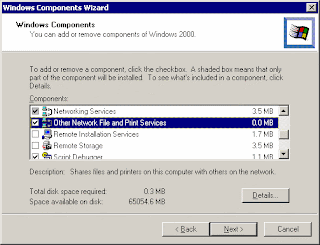
To Install File Services for Macintosh, go to Control Panel>Windows Components, select Other Network file and Print Services.


2. Create shared folders for Macintosh users
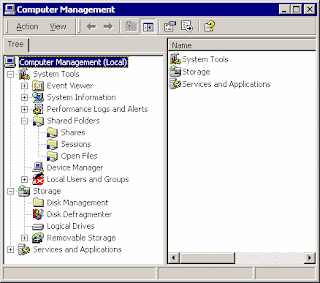
To create shared folders for Macintosh users or in Macintosh volumes, right-click on My Computer, select Manage>System Tools>Shared Folders, right-click Shares>New>File share


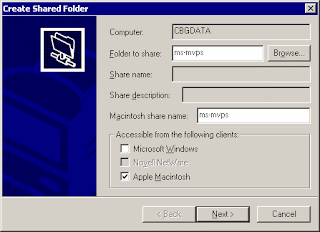
In the Create Shared Folder, check the Apple Macintosh, browse the folder to share, in our case ms-mvps. Then type the Macintosh share name such as ms-mvps. click Next to finish.


Now, if you have assigned permission to Macintosh users, they should be able to access the shared folder, ms-mvps.
Information From

create the same workgroup

Do I need to create the same workgroup name for my network

No, not really. You can have multiple workgroups in your network. However, it's better to create the same workgroup name on all computers. That will make it easier and save time to find other computers, especially in the first 15 minutes after logon.
Workgroup common Issue 1 - doesn't work after adding W2K/XP
SYMPTOMS: When setting up a Peer-to-Peer Workgroup, you may have difficulty to network all computers that are running W2K, XP, Win9x, ME and NT. The issues may include the inability to connect to a shared folder or a shared printer, the inability to browse by using Network Neighborhood in Windows 95 or Windows 98, or the inability to browse by using My Network Places in Windows 2000. Some people may find that, before W2K/XP were installed, the computers may have communicated effectively with the other workgroup computers.
RESOLUTIONS: To resolve these issues, configure all computers to have a common networking protocol, a common workgroup, and common user names and passwords
Workgroup common Issue 2 - problem in a mixed OS
Symptoms: 1) win9x computers can see each others but not W2K or XP. 2) win9x and W2K/XP can ping each other by using IP but not computer names. 3) Net view \\computername shows error 53.
Resolutions: this is a name resolution issue. Since this is a workgroup without WINS server, you may need to enable NetBIOS over TCP/IP on W2K/XP. Note: some people find that installing NetBEUI or IPX also work. But loading NetBEUI or IPX is not recommended. If enabling NetBIOS over TCP/IP doesn't work while loading NetBEUI works, this is not name resolution issue. This may cause because of a software like firewall is running.
How to setup bridging network connection
If your computer with two NICs resides between two different IP subnets or two segment networks such as Ethernet network and HomePNA network, you can bridge the tow networks so that it can communicate with each segment. But you can't bridge an Ethernet connection with a VPN or dial-up connection. Also, don't bridge a private network with a connection that has a public Internet.
To bridge two networks, under Network Connections, select two connections (use Shift+Ctrl) you want to bridge, right-click or click Advanced>Bridge Connection. You can have only one network bridge , but the bridge can support multiple connections. You can easily add or remove connections from ntwork bridge by right-clicking the connection and choosing Remove From Bridge or Add To Bridge

Information From
http://www.howtonetworking.com/workgroupsetup.htm

My Blog List

Servers and Storage

Followers